Zalo Icon
Zalo Icon

Case Study

Resources > Case Study > 4> Dian Xiao Er automates accounts payable invoice processing into SAP Business One with an AI Agent

Dian Xiao Er automates accounts payable invoice processing into SAP Business One with an AI Agent

Dian Xiao Er (DxR), a food & beverage group operating multiple outlets across Singapore, replaced manual invoice entry into SAP Business One with an accounts payable AI Agent — an automation solution built on RPA and Intelligent Document Processing (IDP). The AI Agent reads scanned invoices, extracts the data that AP work needs, classifies every line item, validates the result, and posts approved records into SAP Business One through screen-level automation — no SAP API integration required.

Dian Xiao Er AP Invoice Case Study

Who Dian Xiao Er is, and what the AP team carried

DxR runs its accounting on SAP Business One. Behind each outlet sit three departments — Kitchen, Hall and Roast — plus a residual category for costs that belong to no department. Seven persons in charge (PICs) each manage the suppliers assigned to them, and one head PIC oversees the whole picture. Every invoice had to be entered by hand into SAP Business One, in one of three flavours:
  • Item invoices — goods that carry SKU codes and post against inventory items.
  • Service invoices with department allocation — services that must be charged to Kitchen, Hall or Roast.
  • Service invoices without department — overhead and company-wide costs.
Getting this right by hand meant more than typing carefully. It meant remembering, for every single invoice, which store it belonged to and which department should carry the cost.

The problems with manual AP entry

  • Invoices do not carry the codes SAP needs. A supplier invoice rarely says “Hall” or “KTC”. Staff had to split invoices by store and department before scanning, then key the codes in from memory and folder habits. Only humans could do this sorting reliably — which made it the one step nobody could skip.
  • Mixed invoices force line-by-line judgment. One supplier can deliver goods and services on the same invoice. Each line needed its own decision: item, service with department, or overhead expense.
  • Re-entry multiplies risk. Duplicates, missing fields, wrong dates and keying errors all travelled straight into the ledger, and month-end was when the team paid for them.
  • No single view without manual work. The head PIC could only see the consolidated picture after assembling each PIC’s results by hand.

What DxR asked for

Automate the chain from scanned PDF to posted entry — extraction, classification, validation, posting — while keeping three things intact: a human approves everything that reaches the ledger, data stays on DxR’s own machine (strict data locality), and the automation works without a SAP B1 API. UI-based automation was the explicit constraint; the AI Agent was designed to live with it.

How AFusion built the AP AI Agent

1. Folder-based intake, so sorting stays human and fast

PICs scan invoices between 9 AM and 6 PM into a folder structure that is already set up for automated processing. The AI Agent reads the department code straight from the filepath — Kitchen (KTC), Hall (HAL), Roast (RST) or None — so the human step is only “put the paper in the right folder”, not “retype the context”.

2. IDP extraction with outlet matching

At 7 PM the AI Agent processes the day’s folders: it splits multi-invoice files, renames each invoice with its department code for traceability, and extracts the fields AP work needs — invoice number, date, supplier, line items, quantities, prices, totals, tax. The supplier name is matched to the SAP vendor name, and the delivery address on the invoice is matched against DxR’s outlet-code master file to confirm the store; if no address match exists, the filepath decides.

3. Line-level classification against the master file

The agent searches each line’s description in the item master. A match means an item-type line. No match means the agent reads the description: goods go to a highlighted queue for a human to create the new item code; services flow to the service workflows, with department allocation decided by the vendor’s service category, and company-wide services posted as expenses. Classification happens per line, so mixed invoices split cleanly.

4. Validation before any human reviews

Missing fields, duplicate invoice numbers, unusually high amounts and invoice dates outside a two-month window are flagged and highlighted in each PIC’s result file. Each PIC can open only their own file; the head PIC receives the consolidated “All Results” file. Failed files move to an Ignore folder with an error report, and a notification email carries each PIC their own summary.

5. Approval-gated posting into SAP Business One

PICs verify flagged data against the physical invoices. At 2 PM the next day, the AI Agent posts only the records with no unresolved exception, entering SAP Business One through screen automation exactly as a clerk would — and the audit trail records every event from extraction to posting.

What testing and go-live showed

Before acceptance, the extraction engine was tested against hundreds of real invoices across the vendor base — the test and classification log covers more than 3,600 invoice line items, with issues tracked vendor by vendor until resolved. The formal UAT ran and resulted for go-live: 100% of test cases passed, zero critical issues, zero outstanding issues.

Performance the system is built to deliver

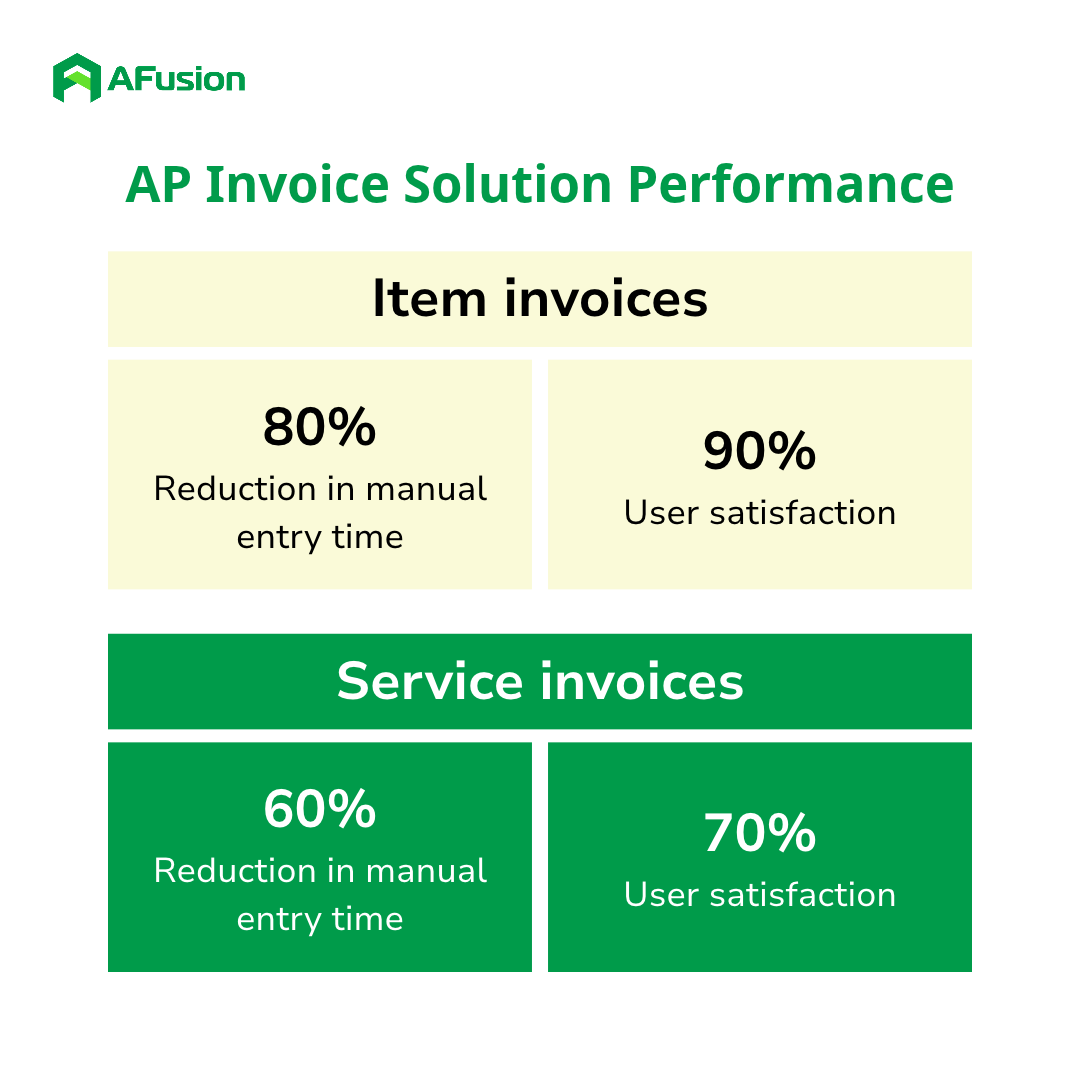
The project’s success targets are explicit in the requirements: for item invoices, an expected 80% reduction in manual entry time with 90% user satisfaction in the first month of deployment; for service invoices, an expected 60% reduction with 70% satisfaction. The approval-gated design is what makes those targets safe to chase — speed never comes at the cost of an unreviewed entry in the ledger.

DxR AP Invoice Case Performance

Does this look like your AP process?

If your team sorts paper before scanning it, keys department codes from memory, and holds its breath at month-end, the bottleneck is not effort — it is process shape. AFusion maps an AP cycle the way this project started: where invoices enter, what context only humans can add, and which steps an AI Agent can own end to end. A short workflow review shows which part of your payables an AI Agent can take over first, and what the saved hours are worth.

Frequently asked questions

What is an AI Agent in accounts payable automation?

An AI Agent is software that runs the AP invoice workflow end to end — reading documents, classifying line items, validating data, and posting entries — rather than replaying keystrokes on one screen. In this project, the agent combines RPA for screen-level execution with IDP and large-language-model assistance for document understanding, while humans keep approval over every entry.


Can the AI Agent post invoices into SAP Business One without an API?

Yes. The agent drives SAP Business One’s own screens through UI automation, exactly as a clerk would type, so no SAP API development or licence change is needed. The posting result is a real entry in SAP, with journal numbers recorded back into the result file.


How does the AI Agent know which store and department an invoice belongs to?

Two ways. The folder path the PIC scans into already carries the department code, and the agent cross-checks the invoice’s delivery address against the customer’s outlet master file. When the address match fails, the filepath decides.


What happens when one invoice mixes goods and services?

The agent classifies each line individually. Lines matching the item master post as items; unmatched goods lines are highlighted for a human to create the item code; service lines follow the service workflow with or without department allocation.


Does a human still approve entries before they hit the ledger?

Yes. Each PIC reviews flagged exceptions against physical invoices, and the AI Agent posts only records with no unresolved exception, the next afternoon. Every action is logged in the audit trail.

Comments are closed.