



Resources > Case Study > 7> Highlands Coffee automates e-invoice processing into Dynamics 365 with AFusion



Highlands Coffee automates e-invoice processing into Dynamics 365 with AFusion
Highlands Coffee, one of Vietnam’s largest coffee chains, runs a dense store network across the country’s three regions. Every month, its accounts payable (AP) team had to log into the government e-invoice portal and a stack of vendor portals to collect electricity, water and rent invoices, read each invoice, work out which store and which expense account every line belonged to, and key it all into Microsoft Dynamics 365 by hand. With AFusion, that work now runs on an accounts payable automation system: AI agents retrieve the e-invoices, parse the data, match each line to the right expense account and store, then create and post journal entries in Dynamics 365 — while the AP team reviews only the items the system flags.

Who Highlands Coffee is, and what the AP team carried
Highlands Coffee operates stores across all three regions of Vietnam — North, Central and South. Every store consumes electricity, water and leased space, so each month the AP team receives a steady stream of utility and lease invoices, and a single invoice often covers several stores at once. The government tax portal holds multiple accounts — one per branch — so even collecting the invoices meant logging in and out of different accounts, day after day.
The ERP is Microsoft Dynamics 365 Finance & Operations, and every invoice has to become a posted journal entry there: expense lines carrying the correct expense account (COA) and store dimension, VAT lines, and a credit line for the vendor payable. A journal that is not posted does not appear in the financial reports — so the work is not finished until the posting is done.
What non-PO invoices are, and why they eat the most time
A non-PO invoice is a bill that did not start from a purchase order. Nobody raises a purchase order for a store’s electricity bill or the monthly rent of a leased location. Yet these are exactly the invoices that recur every month at every store: electricity, water, rent, and miscellaneous services.
That is also what makes them the heaviest part of accounts payable work. A purchase-order invoice arrives with an anchor — the system knows what was ordered, and matching has a reference point. A non-PO invoice has no such anchor: someone must decide which expense account and which store each line belongs to, on every invoice, for every line. Multiply that by the number of stores and the number of utility providers, and you have the month-end routine the Highlands Coffee AP team used to carry entirely by hand.
The problems with manual processing
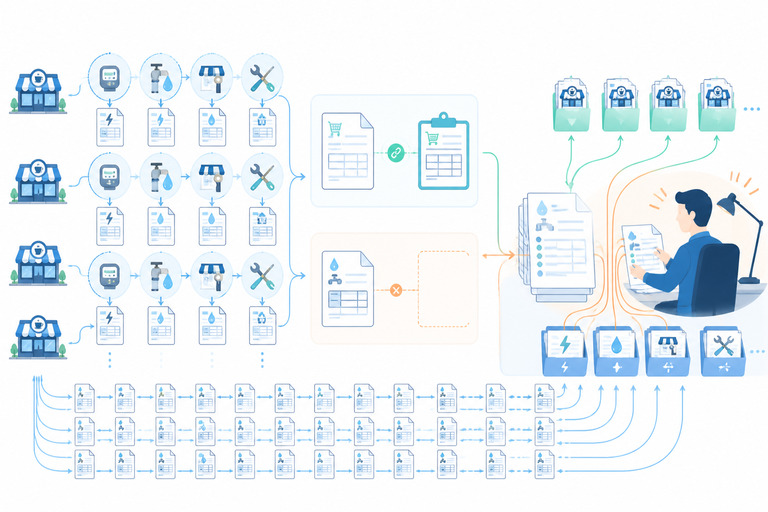
Before the automation, the AP team’s routine looked like this:
- Log into the Vietnamese government tax portal — once per branch account — to download new e-invoices.
- Log into each vendor’s own portal to collect the invoice files.
- Open each invoice’s XML/HTML files and extract line items, tax amounts and totals.
- Decide which expense account (COA) and which store each line item belongs to.
- Create the journal entries in Dynamics 365 by hand.
- Post those journals to finalize them in the ERP.
- Track every invoice’s status in a shared Excel tracker on SharePoint.
- Email processing results to the people in charge.
None of these steps requires deep accounting expertise on its own. Together, they consume days of careful clicking and typing — and every one of them is a chance to miss an invoice, key it to the wrong store, or book it twice. Invoice volume grows with the store network; the team’s working hours do not.
How AFusion built the AP automation
The solution is an AP automation system built on the AFusion Orchestrator platform: five AI agents that run on a daily schedule — and can also be triggered manually — handing work to each other through shared queues. Each step can be retried on its own, failed invoices are isolated and fixed one by one, and the whole pipeline can be paused at any point for a human to look. Here is what each part does, in plain terms.
1. Invoices come to the system, not the other way around
On schedule, the AI Agents log into the government e-invoice portal for every configured branch account and pull the new invoices from the last few days. They do the same across multiple vendor portals — electricity providers, water companies, telecom, mall management — each portal with its own login mechanism, each handled accordingly. And if a vendor portal is down or a login fails, the system automatically falls back to the government portal to retrieve the same invoice. One bad portal day does not mean a missed bill.
2. Every invoice is read, parsed and classified
The system downloads each e-invoice file, extracts the header, line items, VAT rates and amounts, and totals, then classifies the invoice by expense type — lease, electricity, water, or other. Invoices whose number and serial have already been processed are detected as duplicates and skipped, so nothing is booked twice. The original invoice files are archived on SharePoint in a folder structure organized by region, branch, date and vendor, so audit and compliance can always find the source document.
3. The hard part: knowing which store and which account
This is the step that used to live in people’s heads — and it is where the system gets smart. For lease invoices, each line’s description is matched against keyword patterns in the lease master data using AI text matching, which determines the expense account (COA) and the store that should carry the cost. The system also reads the lease period straight out of the description — for example “01/01/2026 – 31/03/2026” — and when one invoice covers several stores, it splits the lines by store.
Crucially, the system does not guess. If a line cannot be resolved to an account and a store with confidence, the invoice is flagged for a human to assign, then rejoins the pipeline afterwards. The same applies to invoices outside the allowed period or vendors missing from master data: they stop at a “needs human review” status instead of entering the ledger wrong.
4. Journal entries created and posted in Dynamics 365
Once an invoice passes validation, the system builds the journal exactly the way a clerk would: expense lines grouped by VAT rate, VAT lines grouped by tax rate (10%, 8%, 5%, 1%), fee lines where applicable, and a credit line for the vendor payable. The journal is created in Dynamics 365 through the ERP’s API — and if the API is unavailable, the AI agent falls back to filling the same journal screen a person would fill. A separate workflow then posts the journal so the entry appears in the financial reports, and records the voucher number back into the tracker.
5. Humans stay in charge of exceptions
Automation that touches the ledger has to control fail risk gracefully. Temporary problems — an API timeout, a portal hiccup — trigger automatic retries with growing delays, up to a configured limit. Business problems — a missing account code, an ambiguous lease match — are routed to human review instead of being retried endlessly. A failed invoice never blocks the rest of the batch: it is isolated, fixed, and re-run on its own. And at any point, the team can pause the pipeline and inspect it.
What the AP team sees every day
Every invoice has one row in a shared AP tracker on SharePoint: vendor, invoice number and serial, expense type, store and account, processing status, voucher number after posting, and the person in charge (PIC). The tracker updates itself from the pipeline, so nobody maintains it by hand — and the note columns that belong to the team are never overwritten by the AI agent.
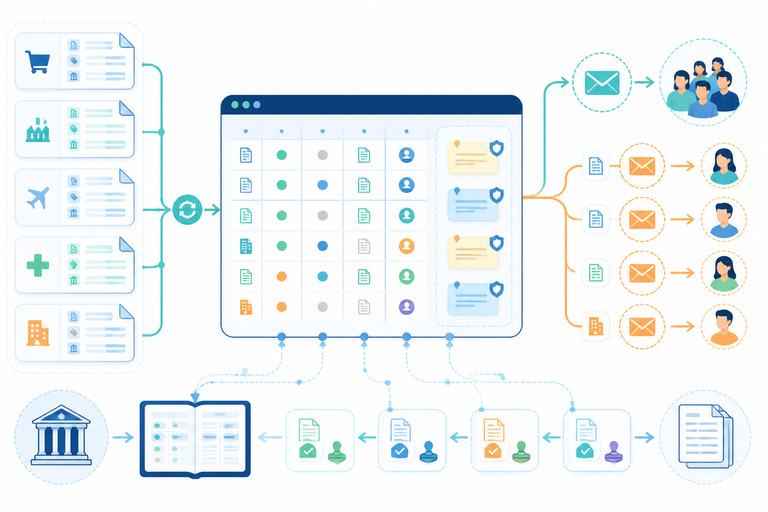
Email keeps everyone pointed at their own work: a summary email to the whole AP team after each run, and a separate email to each PIC containing only the invoices they are responsible for. Between the tracker, the emails and the archived invoice files, every entry in the ledger can be traced back to its source document.
What this changes at month-end
Utility and lease invoices arrive on their own schedule, while manual posting tends to lag — then bunch up against the closing calendar. With invoice collection, reconciliation and journal creation running every day, bookkeeping keeps pace with the bills: by the time the team closes the period, the routine invoices are already posted, and what remains is the exceptions that genuinely need a human decision. The hours that went into logging into portals, downloading files, keying journals and copying status into Excel shift to the AI agents. That is the point of accounts payable automation — not replacing accountants, but giving them back the part of the job that actually needs them.
What comes next: purchase-order invoices
The system was designed from the start to handle both non-PO and purchase-order-linked invoices. The PO flow — extracting the PO number from the invoice, looking it up in the ERP, matching goods receipts and tolerance rules before posting — has been designed and tested on the platform, and is planned for activation in the next phase. The invoices with no purchase order to lean on are already running daily; the ones that have a PO are next.
Does this look like your AP process?
If your business runs branches or stores across cities or regions, if your team logs into the tax portal and a pile of vendor portals every month, if utility and rent invoices have to be split by store before anyone can post them — then the Highlands Coffee story is your story with the names changed. The bottleneck in that process is not effort; it is process shape. AFusion maps an AP cycle the way this project started: where invoices enter, which decisions only humans can make, and which steps automation can own end to end. A short workflow review shows which part of your payables can run on AI agents first — and what the recovered days are worth against your closing calendar.
Frequently asked questions
Can AP automation really download e-invoices from the government tax portal automatically?
Yes. The system logs into each configured tax portal account, queries invoices within a date range, and downloads the invoice files, handling the portal’s login challenges along the way. On the Highlands Coffee project, the AI agents do this for every branch account on a daily schedule.
How does the system know which expense account and store an invoice belongs to?
Through AI text matching. Invoice line descriptions are matched against keyword patterns in the customer’s lease and expense master data, which carry the expense account and store. Multi-store invoices are split by store. Anything that cannot be matched with confidence goes to a human instead of being guessed.
What happens when a vendor portal is down or changes its interface?
Two safety nets. If a vendor portal download fails, the system falls back to the government tax portal to retrieve the same invoice. If a step fails temporarily, it retries automatically with growing delays; if it keeps failing, the invoice is isolated for review without blocking the rest of the batch.
Does the AI agent post real journal entries into Dynamics 365?
Yes. Journals are created through the Dynamics 365 API, with screen-level automation as a fallback, and then posted through the ERP’s own screens — exactly the steps a clerk would perform. The voucher number from posting is recorded back in the tracker.
Does an accountant still review the invoices?
Yes — the exceptions. Invoices that pass validation and matching flow through automatically; invoices with unresolved account codes, ambiguous matches or unusual periods wait in a “needs human review” status, and each PIC is emailed only their own items.
Which invoices does this automation handle?
Non-PO invoices today — electricity, water, leases and miscellaneous services — which is the highest-volume, most repetitive part of accounts payable for multi-location businesses. Purchase-order invoice processing is designed and tested on the platform, and planned for the next phase.
 Previous Post